How to Set Up a GLP-1 Tracker on iPhone: Your First Week in Gilly, Step by Step
A step-by-step guide to setting up Gilly for Ozempic, Wegovy, Mounjaro or Zepbound: add your medication, set a weekly reminder, enter your dose plan, log your first shot and rotate injection sites. No account needed.
The first week on a GLP-1 is full of small questions. Which day is my shot? Which side did I use last time? Was that nausea worse than yesterday? A tracker answers those for you, so you don't have to remember them.
This guide walks through setting up Gilly, the private GLP-1 tracker for iPhone, in about five minutes. You won't create an account at any point. Everything you enter stays on your phone.
Gilly is a tracking tool. It doesn't give medical advice or tell you what dose to take. Your dose, schedule and any changes come from your prescriber.
Step 1: Open Gilly and do the quick setup
When you first open Gilly, you'll see a short welcome, a privacy summary, and a medical disclaimer. Then comes Quick Setup:
- Pick your weight unit (pounds or kilograms) first.
- Enter your starting weight.
- Add a few baseline details if you want them.
You can change any of this later in Settings → Profile. If you started your medication before you downloaded Gilly, set your treatment start date there too, so your charts begin on the right day.
Step 2: Add your medication
Go to the Meds tab and tap +. Pick your medication from the list. Gilly includes Ozempic, Wegovy, Mounjaro, Zepbound, Saxenda, Trulicity, Victoza, compounded semaglutide and tirzepatide, and more. If yours isn't listed, you can add a custom one.
Once it's added, the Meds tab shows a Next Dose card with the day and time, plus two buttons: Log Dose and Reschedule.
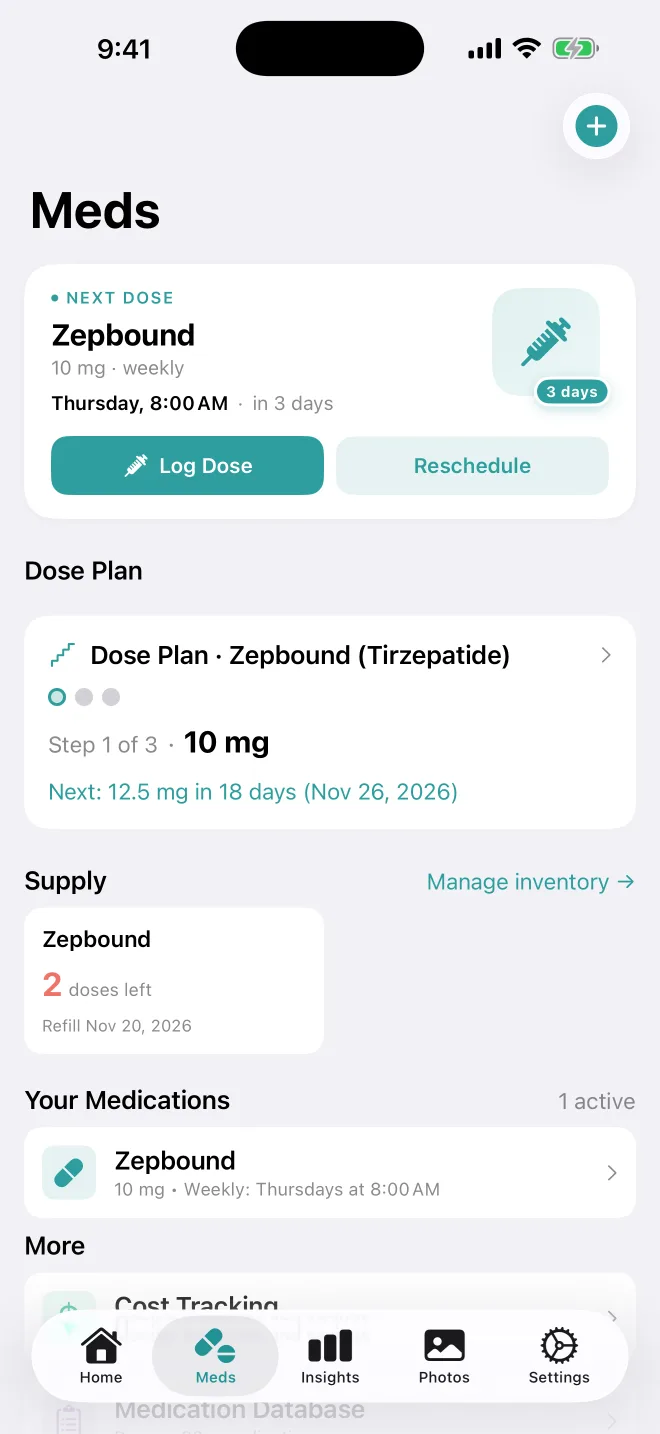
The free version tracks one active medication. If you're also tracking something else, like a second prescription or a supplement, that's a Premium feature.
Step 3: Set your schedule and reminder
Tap Reschedule on the Next Dose card to set how often you take it (weekly, daily, twice weekly or a custom interval), which day, and what time you want the reminder.
When the reminder goes off, tap it and Gilly opens the log sheet already filled in with your medication. Reminders are scheduled on your iPhone, so they work without an internet connection. You can see and manage your reminders in Settings → Notifications.
Tip: pick a time you're reliably home and not rushing. Lots of people choose a weekend morning or a weeknight after dinner.
Step 4: Enter your dose plan (optional)
If your prescriber gave you a plan to step up over time, add it as a Dose Plan. You enter each step exactly as your prescriber wrote it: the dose and how many weeks you stay there.
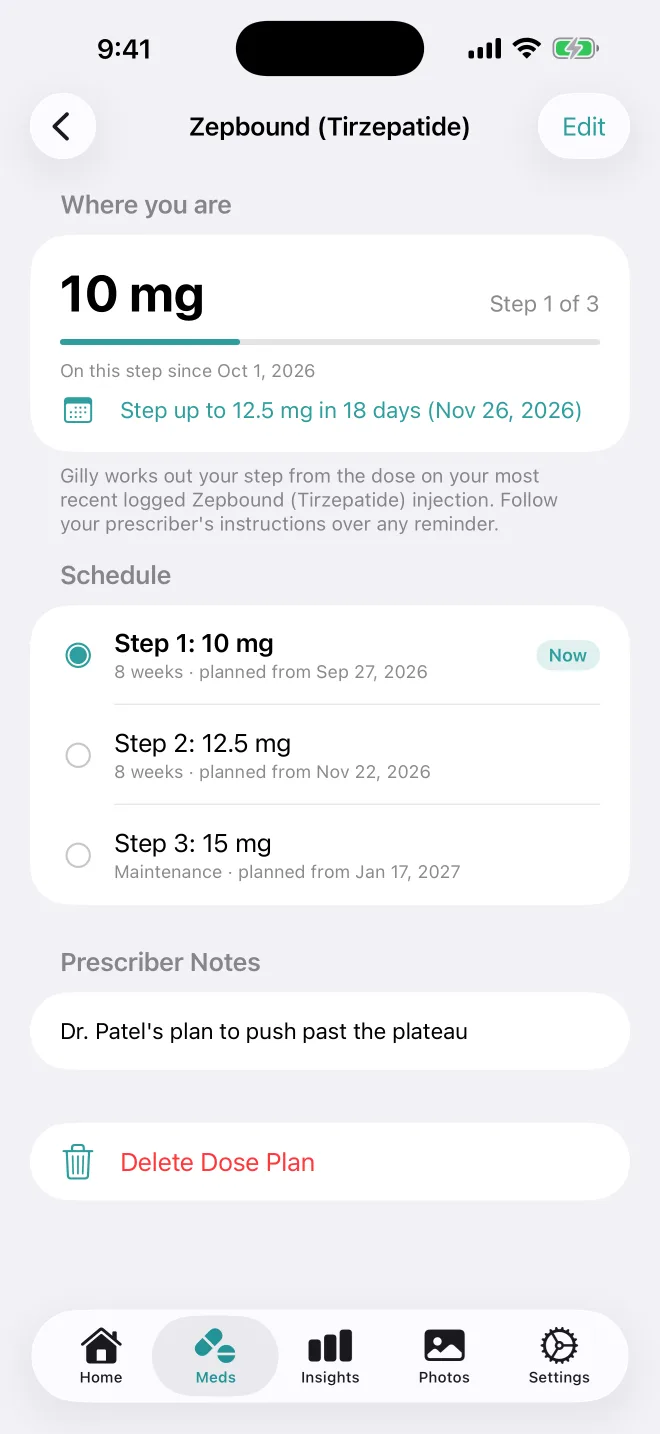
Gilly then shows which step you're on and the date your next step is planned. It works out your current step from your most recent logged dose. As the app itself says, follow your prescriber's instructions over any reminder. If your clinician changes the plan, edit it to match.
Step 5: Log your first dose
On shot day, tap Log Dose. Check the medication and dose, then choose where you injected. Gilly suggests the site you've used least recently, so rotating takes no thought.
You can change the date and time if you're logging after the fact, and add a note (for example, "pen was cold" or "felt fine").
After a few weeks, the Injection Sites view in Insights shows a body map of where you've injected and how long it's been since each spot.
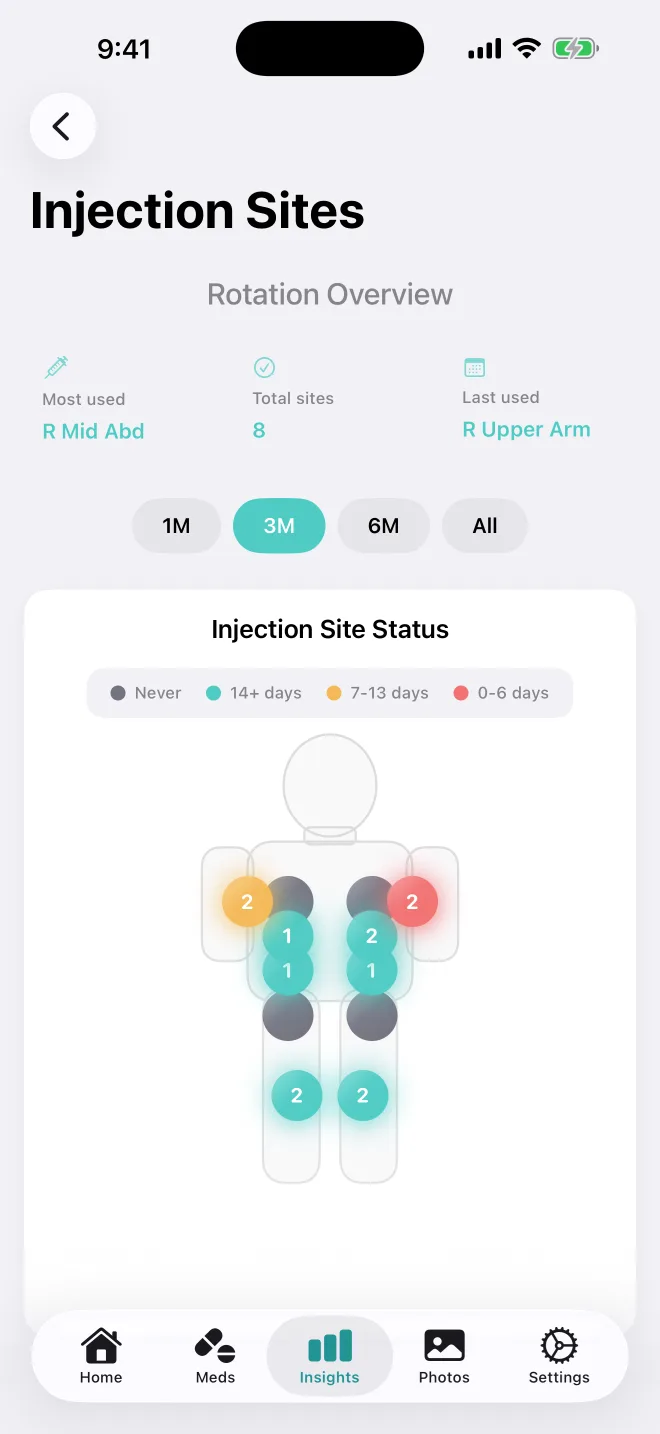
Want the background on why rotation matters? Read our injection site rotation guide.
Step 6: Add the things you want to watch
None of these are required. Add the ones that matter to you:
- Weight: log as often as you like. Gilly charts it against your doses.
- Side effects: log what you feel and rate how strong it is, linked to a dose if you want. Our guide to what side effects to track covers what's useful to note.
- Food noise: a quick rating of how loud food thoughts were today.
- Protein and water: quick-add buttons for daily totals.
The more consistently you log, the more useful your history becomes when you talk to your clinician.
Step 7: Lock it
Your health data is personal. Turn on App Lock in Settings to require Face ID (or your passcode) every time Gilly opens. There's no account and no cloud copy, so nobody can sign in to your data from somewhere else.
What your first week looks like
By the end of week one you'll have:
- one logged dose with its site,
- a reminder set for the next one,
- a few weight or side effect entries if you added them,
- and a dose plan that tells you when the next step is planned.
From there, the routine is simple: the reminder comes, you tap it, you log. Gilly keeps the history so you can bring real numbers to your next appointment. Our follow-up appointment checklist shows what to bring.
Ozempic, Wegovy, Saxenda and Victoza are trademarks of Novo Nordisk. Mounjaro, Zepbound and Trulicity are trademarks of Eli Lilly and Company. Gilly is an independent app and isn't affiliated with or endorsed by either company. This article is for general information and isn't medical advice. Talk to your clinician about your treatment.